Best AI Ad Generators in 2026 - Model Comparison
SonaCreated on: Updated on:
Every best AI ad generator list in 2026 reads the same way: ten tools, ten screenshots, ten affiliate links. None of them tell you what the tool is actually doing when you click generate.
We've been building a design model at Sivi for the past four years. Working on the technology itself changes how you see the market. You stop looking at features and start looking at architectures. And once you do that, the 30+ tools that call themselves AI ad generators collapse into just three categories.
Some generate designs. Some generate images. Most fill templates.
This is the real breakdown of the AI ad generators worth knowing about in 2026. Organized by what they actually do, not by their marketing copy.
Three ways AI tools generate ads in 2026
Before the individual profiles, a quick primer on the underlying technology.
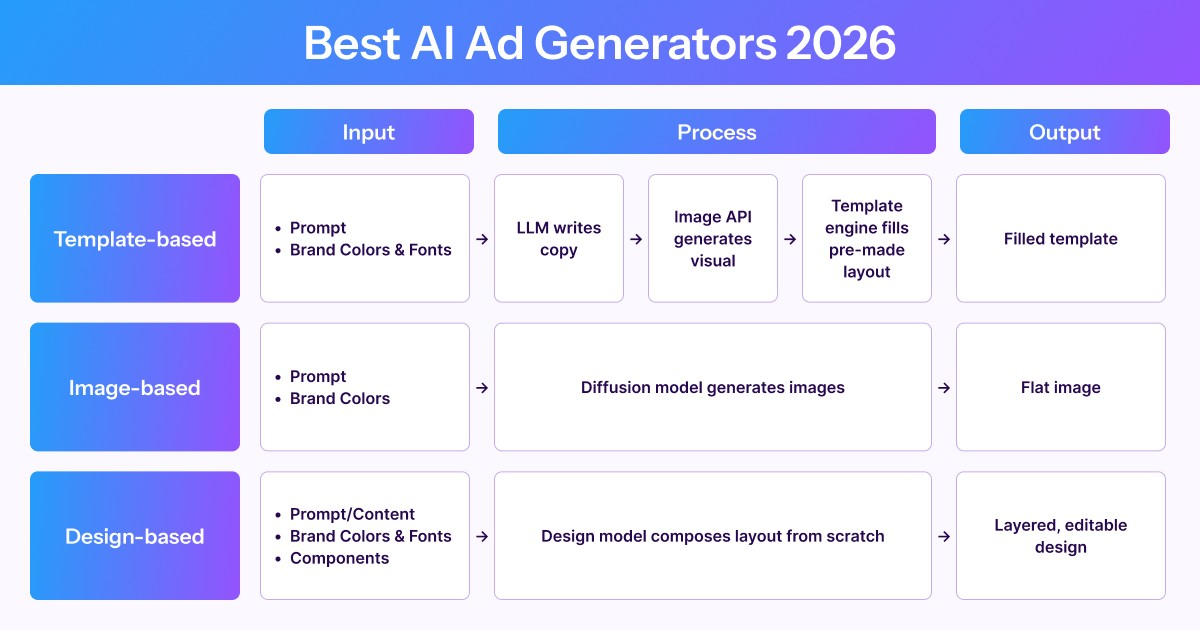
Template-based:
The tool selects a pre-made layout and fills it with your text and images. An LLM writes the copy, an image API generates the visual, but the layout was designed by a human before you showed up. Most tools on the market work this way.
Image-based:
An image generation model produces a flat image that looks like an ad. The headline, background, CTA, and product photo are all fused into one layer of pixels. You can't click the headline and change it. You can't swap the product image without regenerating the entire thing.
Design-based:
A design model composes a layered, editable design from scratch. Text is real text. Images are separate objects. You can click any element and edit it. This is what a Large Design Model does.
Most tools offer a free tier or trial, but the method matters more than the pricing plan. The method determines whether the output is editable, brand-consistent, and scalable across formats. Here's a detailed breakdown of the three types of AI ad generators.
Static ad generators
Sivi: design-based ad generation
Model: Sivi Gen-2.7, a Large Design Model (LDM) Method: Design generation. Composes layered layouts from scratch. Free tier: 12 designs per month, no credit card required
Sivi's Gen-2.7 is a Large Design Model. It doesn't use templates and doesn't generate flat images. The model composes a free-form layout for every prompt, with each element on its own editable layer. Headline, subheading, CTA, product image, background: they're all separate objects you can click and edit after generation.
What it does well. Describe your ad once and generate it in any size: 300×250 display, 1080×1080 social, 728×90 leaderboard, 1080×1920 story, custom dimensions. Brand kits enforce your colors, fonts, logo, styles, and components across every output. Supports 72+ languages with layout composition adapted to each language's typographic conventions.
What it can't do. Sivi doesn't generate photorealistic images. If your campaign depends on AI-generated photography or artistic illustrations, you can use the image models within Sivi for those assets, or bring assets from image models as inputs.
Who it's for. Marketers and small business owners who need production-ready ads with accurate text, editable layers, and consistent branding across sizes. Developers who want to integrate ad generation into their product via API or SDK.
Recraft: image-based ad generation
Model: Recraft V4, an image generation model Method: Image generation. Produces flat images that look like ads. Free tier: Daily credits. Generated images on free plan are public. Paid plans from $25/month.
Recraft is an image generation model, not a purpose-built ad generator. But it's one of the better image models for design-adjacent work because it handles text rendering and vector output better than most competitors.
Recraft V4 can generate ad-style images if you prompt it carefully. Unlike general image models like Midjourney or DALL-E, Recraft was built with designers in mind. It supports vector output in SVG format, which is unique among free image generators. The model handles typography better than most image generators, though "better" still means occasional misspellings and no ability to edit text after generation.
What it does well. Visual quality. Recraft V4 produces clean, design-oriented images with solid color palettes and composition. The vector output option is genuinely useful. If you need an illustration or graphic element for an ad, Recraft is a strong choice for generating the visual asset itself.
What it can't do. Recraft generates images, not designs. The output is a flat file, whether raster or vector. There's no concept of separate text layers, brand kits, CTA buttons, or layout composition. You can't change the headline after generation without regenerating the entire image. On the free plan, every image you generate is public and visible in Recraft's community gallery. If you're generating ad creatives for a client or an unreleased campaign, that's a dealbreaker.
Who it's for. Designers who need high-quality visual assets, illustrations, or graphic elements to use inside an ad they'll assemble elsewhere. Not for generating complete, editable ad creatives.
Canva: templates and image decomposition
Models: Leonardo Phoenix for image generation, LLM API for copy Method: Two methods: template replacement, and image generation with decomposition Free tier: Generous free plan with thousands of templates. AI features are limited on the free tier.
Canva is the elephant in the room. Over 200 million users. The largest template library in the market. And increasingly, AI features layered on top.
Canva uses two distinct methods for ad creation. Understanding both matters.
Method 1: Template replacement. This is Canva's core product. You browse a library of pre-made ad templates, pick one, swap in your copy and images, adjust colors, and export. AI features help with copy suggestions and resizing, but the layout is pre-designed. The same template is available to every other Canva user.
Method 2: Image decomposition via Canva AI 2.0. Canva acquired Leonardo AI, an image generation model. In this mode, Leonardo generates a flat image based on your prompt, then a second model attempts to separate the image into editable layers by guessing where text, foreground, and background boundaries are. The result is better than a pure flat image, but the "layers" are reconstructed, not composed. Move a text element and the background patch behind it often looks wrong, because the layer didn't exist as a separate object originally.
What it does well. Sheer volume of templates and resources. If you need a quick ad that looks professional and you don't need a unique composition, Canva's template library is hard to beat. The drag-and-drop editor is polished.
What it can't do. Generate unique layouts. Every template is shared across millions of users. Canva AI 2.0 produces decomposed images, not composed designs, so editing breaks easily. Brand control is limited to color and logo swapping. The layout itself doesn't adapt to your brand's component system. Resizing usually means switching to a different template for each ad size.
Who it's for. Small business owners who want quick, professional-looking ads and don't mind using a shared template. Teams already in the Canva ecosystem.
Template-based AI ad generators
The tools below share a common architecture. They combine an LLM for copy, an image generation API for visuals, and a template engine for layout. The AI writes text and generates images. The template handles the design. If you've read about how most AI design tools actually work under the hood, this is the pattern.
That's not a criticism by itself. For many use cases, it works fine. But it means the layout is never generated. It's selected and filled.
Lapis
Method: Template-based with brand auto-detection Free tier: 5 ad credits per month, no credit card required
Lapis is a Y Combinator-backed ad generator that auto-detects your brand from a URL and generates ads sized for Meta, Google, LinkedIn, and display networks. Under the hood, it's template-based: the tool selects a layout, fills it with AI-generated copy and images, and formats it for each platform.
Good for: Quick ad creation for paid social campaigns with automatic platform sizing. The brand auto-detection saves setup time.
Can't do: Generate unique layouts. The ad composition is pre-made, not generated. Limited to 5 ads per month on the free tier, which is barely enough to evaluate the tool.
Who it's for: Marketers running multi-platform social ad campaigns who need fast output and don't need unique compositions.
Quickads
Method: Template-based with image generation Free tier: Free plan available
Quickads generates ad banners using templates. The platform also integrates Nano Banana Pro for image generation within the ad creation workflow. You describe your product, pick a template style, and the tool fills the layout with AI-generated copy and images.
Good for: Quick banner creation when you need something basic and fast. The Nano Banana Pro integration means you can generate product visuals and ad layouts in one place without switching tools.
Can't do: Compose unique layouts. The template defines the structure.
Who it's for: Small businesses that need basic ad banners quickly without design skills.
Creatify
Method: Primarily video ads, template-based for static Free tier: 10 credits per month
Creatify is primarily a video ad generator that also produces static ad creatives. For static output, the method is template-based. For video, it generates UGC-style video ads with AI avatars from product URLs. The company has earned strong reviews for its video capabilities.
Good for: Video ad creation, specifically UGC-style ads with AI avatars. The URL-to-video workflow is convenient for ecommerce brands that want to turn product pages into video ads quickly.
Can't do: Generate unique static ad compositions. Static ads use templates. The 10 free credits per month are shared between video and static generation, and video consumes credits faster, so the free tier runs out quickly.
Who it's for: Ecommerce brands and DTC marketers who primarily need video ads with AI avatars.
AdCreative.ai
Method: Template-based with "Creative Scoring AI" Free tier: 7-day free trial, 10 credits. Requires a credit card. Paid plans from $39/month.
AdCreative.ai generates ad creatives using templates and then scores each variation with a "Creative Scoring AI" that predicts conversion likelihood. The scoring is the differentiator, not the generation method. The underlying process is template-based: layouts are pre-made, and AI fills them with your copy and images.
Good for: Performance marketers who want AI-predicted conversion scores on their ad variations. The scoring feature helps prioritize which creatives to A/B test first.
Can't do: Generate unique designs. The layouts are templates. The scoring model predicts, it doesn't guarantee. There's no real free plan. The 7-day trial requires a credit card, and the entry price of $39/month is steep for small businesses testing the waters.
Who it's for: Paid media teams running large-scale A/B tests who value creative scoring and have the budget for it.
Quick comparison of static ad generators
| Tool | Type | Model / Engine | Free tier | Output format |
|---|---|---|---|---|
| Sivi | Design generation | Sivi Gen-2.7 (LDM) | 12 AI credits/month | Layered, editable design |
| Recraft | Image generation | Recraft V4 | Daily credits, images are public | Flat image or SVG |
| Canva | Template + image decomposition | Leonardo Phoenix + templates | Free plan, AI features limited | Template |
| Lapis | Template-based | LLM + image APIs | 5 ads/month | Template |
| AdCreative.ai | Template-based + scoring | LLM + image APIs | 7-day trial, credit card required | Template |
| Quickads | Template-based | LLM + Nano Banana Pro | Free plan | Template |
| Creatify | Template + video | Proprietary video + templates | 10 credits/month | Template + video |
Video ad tools
Video ads need two layers of tooling: a generation model for the footage, and an editor to assemble the finished ad. Neither layer has a genuinely free option that's production-usable. Generation models are compute-intensive, and free editor tiers come with watermarks.
AI video generation models
Models: Veo 3.1, Runway Gen-4.5, etc. Method: Raw video generation from text prompts Pricing: Credit-based, varies by model and provider
These are the underlying video generation models, not ad-specific tools. You give them a text prompt, and they generate video clips. The output is raw footage, not a finished ad. You'll need to add copy overlays, CTAs, branding, and transitions yourself using a video editor.
Good for: Generating custom video footage like product shots, lifestyle backgrounds, or scene transitions without hiring a videographer. The quality of AI-generated video in 2026 is genuinely impressive for short clips.
Can't do: Produce finished ad creatives. There's no concept of ad layout, CTA placement, copy overlays, or brand guidelines. You get video footage, not a ready-to-run ad.
Who it's for: Creative teams who need custom video assets to assemble into ads manually, and have the editing skills to do so.
Video editing tools
InVideo
Method: Script-to-video with AI editing tools Pricing: Free plan available, but exports are watermarked. Plus plan from $25/month.
InVideo generates videos from text prompts or scripts. The AI builds a storyboard, selects stock footage, adds transitions, and generates voiceover. You can edit the result in their timeline editor. The free plan exists but every export carries a watermark, making it unusable for paid advertising.
Good for: Quick video content for social media and YouTube. The text-to-video pipeline is one of the most accessible on the market. The $25/month Plus plan is the most affordable entry point for usable AI video ads.
Can't do: Produce watermark-free video ads for free. The AI-generated videos tend to follow a formulaic structure, fine for content marketing but lacking the precision needed for conversion-focused video ads.
Who it's for: Content creators and small businesses who need video at volume and can budget $25/month for the Plus plan.
Canva video
Method: Template-based video editing with AI features Pricing: Free tier for basic video. Pro from $14.99/month for full features.
Canva's video editor uses templates and stock footage with AI-powered features like auto-resize and beat sync. It's an editing tool, not a video generation model. You select a video template, swap in your content, and export. The AI assists with transitions and copy suggestions but doesn't generate video from scratch.
Good for: Simple video ads using templates and stock footage. Easy for teams already using Canva for static designs.
Can't do: Generate original video content from a prompt. Custom AI avatars, UGC-style generation, and advanced animation are outside its scope.
Who it's for: Teams that need basic video ads quickly and are already in the Canva ecosystem.
How to decide which type fits your needs in 2026
The right tool depends on what you need the output to actually be.
- If you need editable, brand-consistent ad creatives that you can modify after generation and resize to any format without starting over, the choice narrows to tools that produce layered output. Generate ads with Sivi and compare the output quality yourself.
- If you need high-quality images or illustrations as visual assets for ads you'll assemble in another tool, Recraft produces the best design-oriented images among free options.
- If you need a quick ad from a template and don't mind using a layout shared by millions of other users, Canva's free tier is hard to beat on sheer volume of resources.
- If you need video ads, there's no free option worth using in production. InVideo's Plus plan at $25/month is the most affordable entry point for decent quality.
The technology determines the output, and the output determines whether your ads actually work at scale.
Why the technology comparison matters
Most "best of" lists rank tools by features and price. In 2026, the architecture matters more, because the three categories are on different trajectories.
Image models have plateaued. Each new release improves photorealism by a few percent. But ads need editable text, brand consistency, and format flexibility - none of which gets better when the pixels get sharper. Image models were never built for this problem.
Template tools have hit a ceiling. The architecture is capped by design: a human-made layout filled with AI content. Better copy and better images don't change the fact that the layout itself was never generated for your brief.
Design models are early and improving fast. Output quality sits around 60-65% of a human designer today, good enough for most performance ads, not yet for hero brand work. But unlike image models, the curve is still steep on every axis that matters: layout reasoning, typographic judgment, brand-aware composition.
If you're picking a tool for one campaign, pick whatever looks best today. If you're betting on a creative workflow for the next few years, image models are a plateau, templates are a dead end, and design models are the only category where the trajectory points up.
FAQ
What is the best AI ad generator in 2026?
For editable, layered ad designs with brand enforcement, Sivi is the only tool that generates real design files rather than templates or flat images. For template-based ads, Canva has the most resources. For high-quality visual assets to use inside ads, Recraft produces strong design-oriented images. For video ads, Veo 3.1 produces the best raw footage, but you'll need an external editor to assemble a finished ad. For end-to-end video ad creation, Canva is stronger.
Which AI ad generators have free plans?
Sivi, Recraft, Canva, Lapis, and Quickads offer permanent free plans with no credit card required. Creatify gives 10 free credits per month. AdCreative.ai has a 7-day trial that requires a credit card. Always check whether a credit card is required and what happens when the trial ends.
What's the difference between AI-generated ads and template-based ads?
Template-based tools select a pre-made layout and fill it with AI-generated text and images. The design layout is fixed before you type your prompt. AI-generated ads, using a design model, compose the layout from scratch for each prompt, producing unique compositions with editable layers. The distinction matters for brand consistency, multi-format scaling, and post-generation editing.
Can image generators like Recraft or Nanobanana 2 make ads?
They can produce images that look like ads, but the output is a flat file where all elements are fused into pixels. You can't click the headline and edit it. You can't change the CTA text. You can't resize the ad for a different platform without regenerating the entire image. For concept exploration, image generators work well. For production ad campaigns, they don't scale.
Are there any free AI video ad generators?
No production-ready free options exist in 2026. InVideo has a free plan but exports include a watermark. Creatify offers 10 free credits per month shared across video and static. For usable video ads without watermarks, expect to pay at least $25/month with InVideo's Plus plan.
What model does Canva use for AI ad generation?
Canva uses Leonardo AI with its Phoenix model for image generation. Leonardo generates flat images that Canva's system then attempts to decompose into partial layers. Canva also uses an template replacement. Neither approach composes a free-form design from scratch. Canva's core product remains template-based.
What is a Large Design Model?
A Large Design Model (LDM) is an AI system built specifically to generate free-form, multi-layered graphic designs from text input. Unlike image generators that produce flat pixels, an LDM composes layouts where text, images, and vectors are separate editable layers. Sivi's LDM is a production system that supports brand kits, any custom size, 72+ languages, and exports to JPG, PNG, PDF, and HTML. For more on how LDMs compare to text-to-design models in research, see our technical comparison.
Sivi's Large Design Model generates layered, editable ad creatives from your text and brand assets. Not templates. Not flat images. Every ad is composed from scratch, on-brand, in any size, in 72+ languages.

Author: Sona J Odayappan
Sona is the Co-Founder and Chief Design Officer of Sivi, a generative AI that instantly turns text into business visuals. With a distinguished academic background, Sona started her career as an engineer before transitioning to a designer. Over the last 14+ years, Sona has worked with multiple startups and MNCs in diverse sectors and designed over 35 products. She has evangelized design thinking and formed successful design teams from scratch. Sona is a gold medalist, TiE Women Bangalore Entrepreneurs finalist, MeitY Women Entrepreneurs Award finalist, and an author of a popular design portal.