Claude Design vs Sivi AI: Why HTML generation is not free-form design generation (2026 Comparison)
SonaCreated on: Updated on:
TL;DR: Claude Design vs Sivi AI in one minute
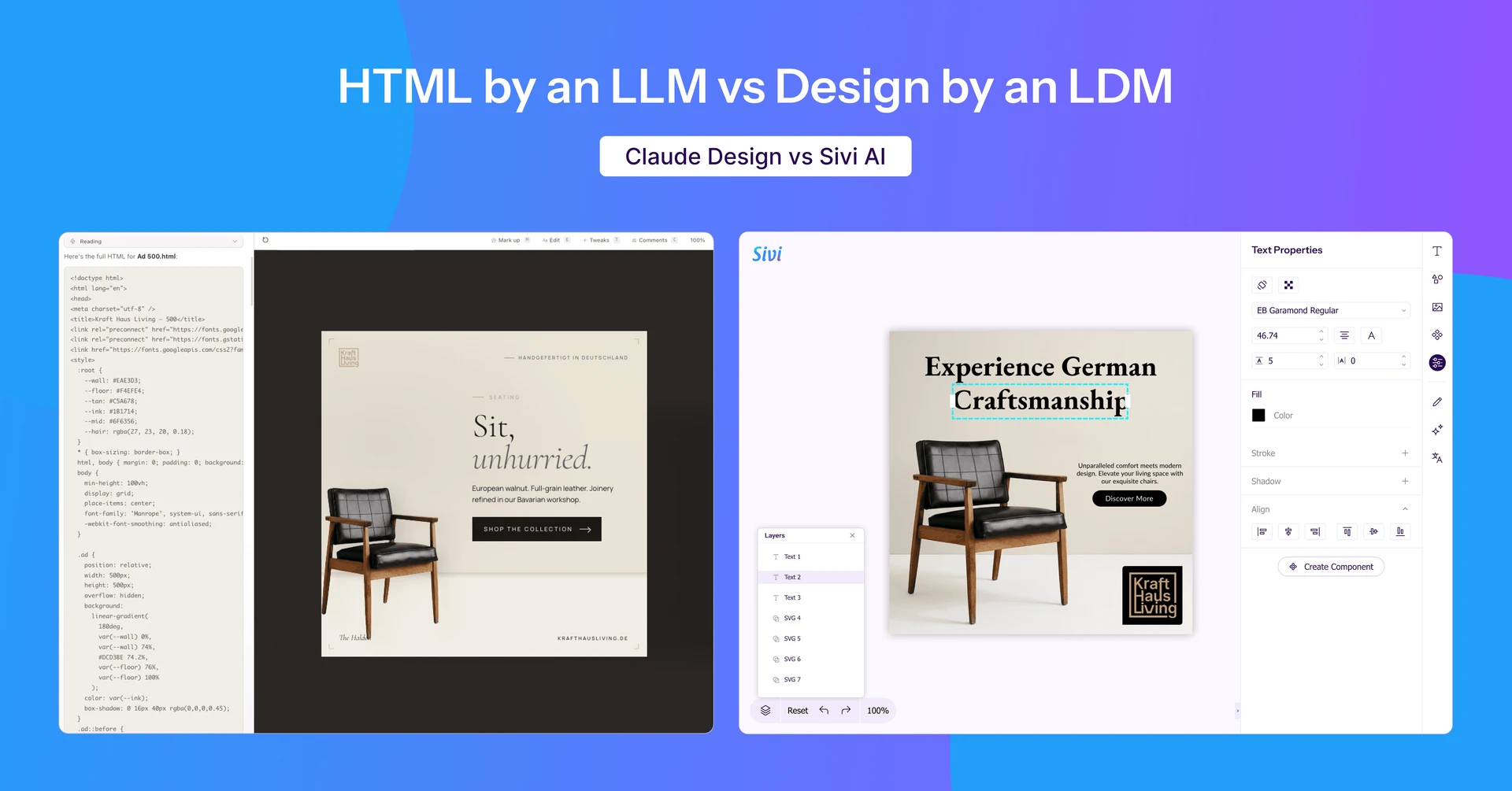
Anthropic's Claude Design and Sivi AI look similar, but they generate two different things. Claude Design is a Large Language Model (Claude AI), writing responsive HTML, CSS, and Javascript. Sivi AI is an Large Design Model (LDM) generating free-form, layered, editable graphic designs on a pixel canvas. You can edit text in both, but only Sivi lets you freely move, resize, rotate, crop, and overlap elements as design layers. Claude Design belongs with Framer and Webflow for websites, prototypes, and slide decks. Sivi's Design Studio belongs with the work you'd do for ads, social posts, posters, banners, and thumbnails. The test that separates them is the second click: edit the text, then try to drag it.
—
Last week I pitched Sivi to an investor. I told her Sivi's LDM generates free-form, editable, on-brand designs in 72+ global languages.
She said, "Sona, Claude Design does that now". That's based on her recent experience creating a presentation with Anthropic's Claude Design. She said "I'll show you", and shared her screen to prove it. She clicked the headline in her deck and edited the text in place. "See? Editable. On-brand. Done."
I asked her to do one thing. Move the headline text two pixels up.
She couldn't. Not because she didn't know how, but because Claude Design's output doesn't work that way. That single drag is where the difference between an LLM generating HTML and an LDM generating a free-form design becomes visible.
This post is about that difference, why it matters, and what each tool is actually for, with the facts checked and the easy comparisons resisted, because Claude Design is genuinely good at what it's built for.
What's the Difference Between Claude Design and Sivi AI?
Short answer: Claude Design produces a website artefact (code that a browser renders). Sivi AI produces a design file (layers on a canvas with coordinates). One is built on a document tree of <div>s, the other is built on free-form layers of pixels. That foundation decides what you can and can't do after the first generation.
Everything below is downstream of that one fact.
Claude Design vs Sivi AI: Quick Comparison Table
| Capability | Claude Design (Anthropic) | Sivi AI |
|---|---|---|
| Underlying model | LLM (Claude Opus, current generation) | LDM: Large Design Model (Gen-2.7) |
| What it outputs | Live HTML / CSS / JavaScript | Layered, vector-based design file |
| Core unit | The <div> in a document tree | The layer on a canvas (x/y, rotation, z-index) |
| Move any element freely | No, adjust via chat, inline markup, or tweak sliders | Yes, drag it where you want |
| Resize/rotate / overlap layers | Constrained (these are code properties) | Yes, directly on the canvas |
| Crop/pan an image to a focal point | No | Yes |
| Add elements from a toolbar | No. Re-prompt to regenerate | Yes |
| Typography | Your design-system fonts + web fonts | Upload and use any brand font |
| Image masking | Limited to basic shapes | Any shape, including custom paths |
| Re-fit across aspect ratios | Responsive reflow (web behavior) | LDM re-lays out layers for the new size |
| Languages | Multilingual via Claude | 72+ languages, layout composed per language |
| Best output | Websites, landing pages, dashboards, prototypes, slide decks | Ads, social posts, posters, banners, thumbnails, emails |
| Sits alongside | Framer, Webflow | Generates natively, and allows to edit as in design tolls like Figma or template tools like Canva |
| Editing model | Chat + inline comments + adjustment sliders + Canva handoff (Canva handoff is only to add new elements, not to edit the HTML) | Direct layer manipulation on a canvas |
| Access | Included in Claude Pro/Max/Team/Enterprise (research preview) | Web app (free + paid), plus REST API and embeddable UI SDK |
| Export | PDF, PPTX, HTML, zip, Claude Code handoff | JPG, PNG, SVG, HTML, PDF |
What does Claude Design actually generate? (HTML, CSS, and JavaScript)
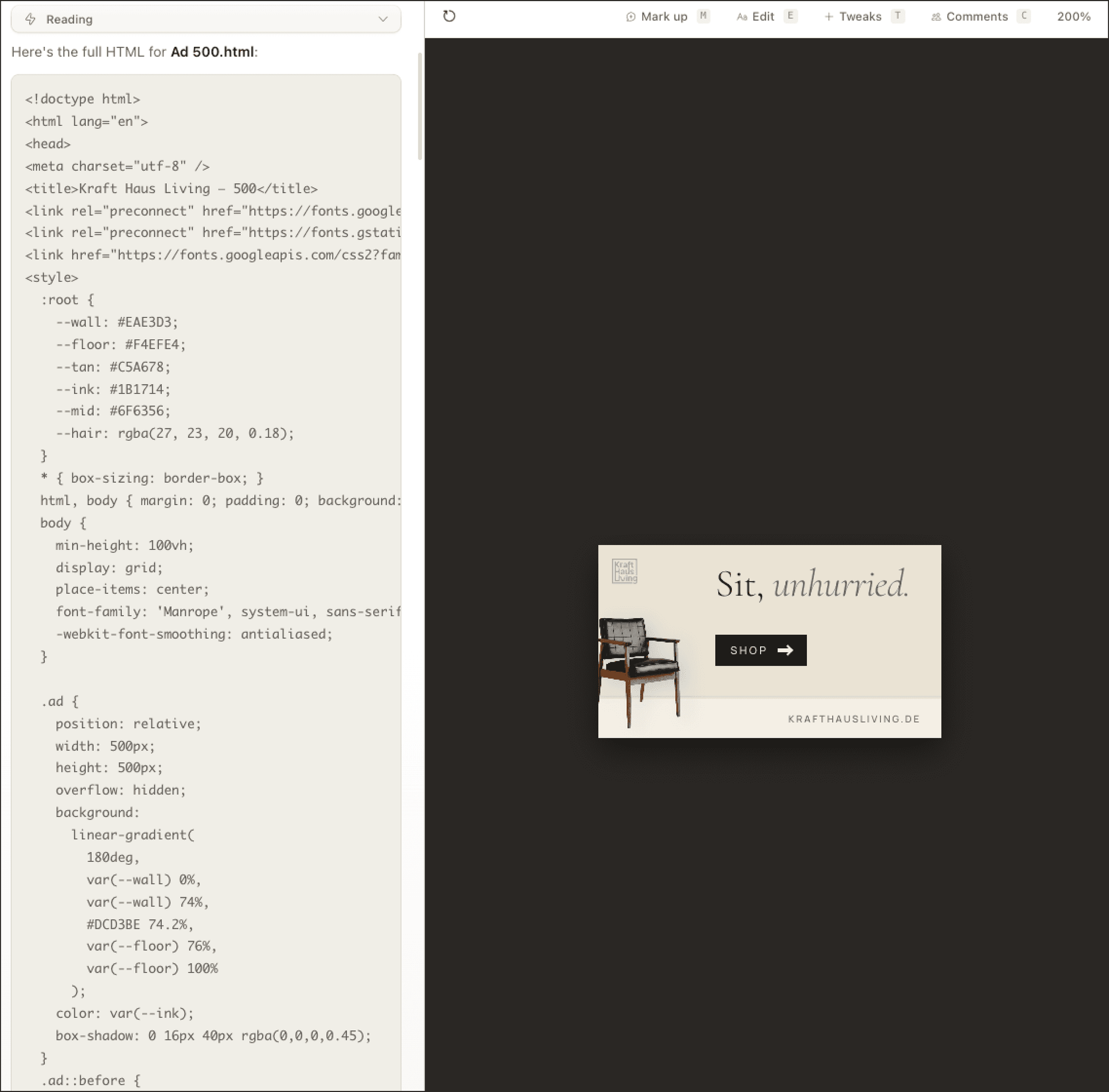
Claude Design generates responsive HTML files. It is actually Claude AI, a large language model, writing code with divs, sections, flex containers, utility classes, a little inline styling. The browser renders the code into something that looks designed. Anthropic launched it in April 2026 as a research preview, and across reviews the consistent description is that the output is live, runnable HTML rather than static images or layered files.
What Claude Design does well
To be clear about what's good here: this is a real, valuable category. The interface has a chat panel on the left and a canvas preview on the right. It can read your codebase or design system so output stays on-brand, and it hands off cleanly to Claude Code when you want to ship. For a landing page, a dashboard, an app-flow prototype, or a pitch deck, it's genuinely useful arguably one of the strongest AI tools in that lane right now.
Where the HTML foundation hits a ceiling
The code-first foundation sets a hard limit on graphic-design work:
- You can't freely move elements. Every element sits inside a parent
<div>in a document tree. There is no x/y coordinate to drag. Asking Claude Design to shift the headline 40px right means rewriting the HTML structure, not nudging a layer. Claude Design does offer inline comments and adjustment sliders for things like spacing and color, but that's guided tweaking, not free placement. - You can't resize or rotate layers directly. Resize handles do not exist on a
divthe way they exist on a design layer. Width, height, and rotation are properties of code, not handles on a canvas. - You can't drop in new elements from a toolbar. To add a shape, icon, or text box, you go back to the prompt and regenerate another agentic pass over the whole document.
- You cannot crop or pan images to a focal point. An image is an
<img>with a source. There's no crop box or focal-point selector to reframe the photo. - Typography is bounded. Claude Design applies the fonts in your configured design system plus available web fonts. You don't get a free per-element font picker across thousands of foundry weights the way a canvas tool gives you.
- Object placement can clip. In practice, when Claude Design fits an object into a container, it tends to crop hard against the edges unless the subject is already centered. A designer would scale, center, and add breathing room. Masking is limited to a small set of basic shapes rather than custom paths.
None of this is a knock on the model's intelligence. It's the foundation. HTML is brilliant for responsive web pages and the wrong primitive for a fixed-canvas ad where the offer needs to overlap the product photo at a 12-degree tilt.
What does Sivi AI generate
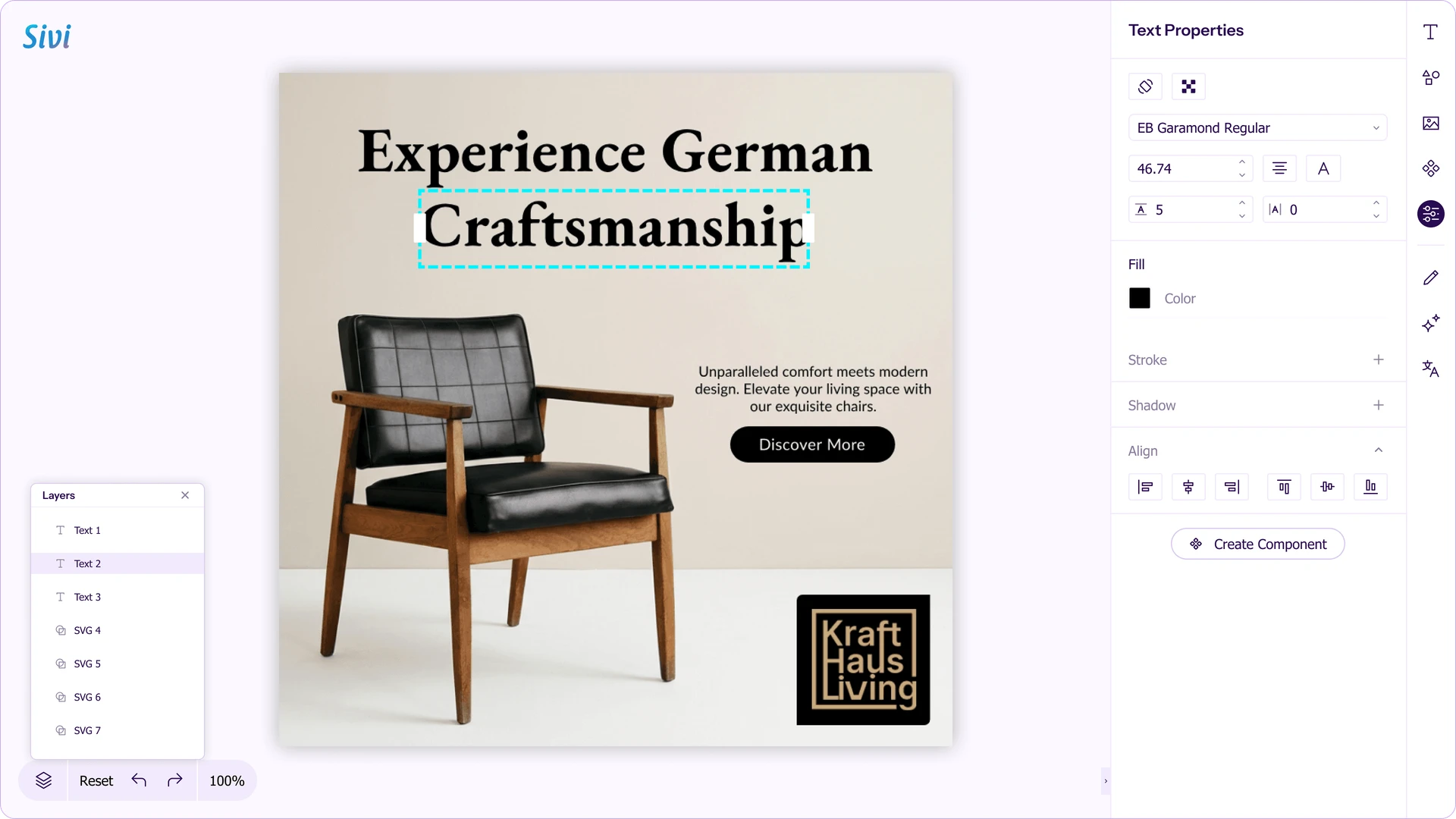
Sivi AI generates a layered canvas using an LDM, a Large Design Model purpose-built for graphic design. Every element, text, shape, image, icon, background, sits on its own layer with x and y coordinates, rotation, opacity, blend mode, and z-index. The output is a design file, not an HTML document.
What is a Large Design Model (LDM)?
Where an LLM predicts the next token in a sequence of text or code, an LDM predicts the next design element: its type, position, size, rotation, color, font, and shadow. It composes a layout following design principles like hierarchy, grouping, and contrast, then renders it as an editable, layered file. Its purpose-built for graphic design, the way an LLM is purpose-built for language.
Sivi runs its LDM (currently Gen-2.7) on Google Cloud, Google Kubernetes Engine, and Vertex AI for training, with Gemini integrated for conversational input and translation. The New York Times has noted Sivi as the only one among roughly 95,000 design apps that produces editable layers, which is a useful shorthand for what an LDM does that an image model or a template tool doesn't.
What you can do on a layered canvas:
- Move any element anywhere on the canvas.
- Resize, rotate, overlap, group, lock, and hide layers.
- Crop and pan images with a focal point.
- Upload and use any brand font.
- Mask with any shape, not just circles and rectangles.
- Resize a 1080×1080 Instagram post to a 1080×1920 story and have the LDM re-lay the layers to fit the new ratio.
- Work in 72+ languages, with the layout composed so typography and hierarchy hold up in the target language.
The point isn't the plumbing; it's that the output is a free-form design composition, the same layered thing a designer builds in Figma, generated from a prompt.
Divs vs pixels: Why HTML and canvas design are different categories
Claude Design belongs in the same family as Framer and Webflow. It's an interface design tool. The unit is the <div>, the layout is a document tree, and the output is a website. That is a legitimate, valuable category.
Sivi sits in a different category. The unit is the pixel on a canvas, the layout is free-form layered composition, and the output is a graphic: an ad, a social post, a poster, a banner, a thumbnail.
Different foundations, different ceilings. HTML is brilliant for responsive sites and terrible for a 1080x1080 ad with overlapping, tilted layers. A canvas is brilliant for that ad and pointless for a scrolling marketing site. This is why the honest answer to 'which is better' is 'for what'.
The Second-Click Test: How to Tell a Document From a Design
Here's the fastest way to tell a document from a design: edit the text, then grab the element and move it. If the layout reflows around your move, you have a document. If the element lands exactly where you drop it, you have a design.
Almost every tool passes the first click: Notion, Canva, Figma, Webflow, Framer, and Claude Design all let you click and edit text. That's why the investor thought the tools were the same. The second click is where they split. Claude Design fails it because there's no free layer to grab; there's a <div> in a tree. Sivi passes it, because every element is a layer with coordinates.
Does Claude's Canva Integration Make It a Free-Form Design Tool?
Short answer: No. But the reason is more interesting than a flat no. There are two routes, and neither one changes what Claude itself generates.
Route 1: The "Send to Canva" export.
Claude Design has a Share/Export menu with a Send to Canva option. What happens next depends on the file type. For simple slide decks, Canva now converts the HTML presentation into a fully editable Canva presentation, with multiple slides and presenter view. For other HTML, Canva imports it as a "Code design." It parses the layout for simple cases, where Claude has generated the HTML in pre-defined formats Canva knows how to read. When the CSS is complex or the format is unfamiliar, you get a render of the code, not a layered file.
That is a real improvement over how this worked at launch, and it is worth being precise about. The editability comes from Canva parsing the HTML on import, not from Claude generating a layered file. It is a conversion step, and it carries the fidelity loss every conversion carries. The design layer is Canva's, not Claude's.
Route 2: The Canva connector (MCP).
Connect Canva to Claude and you can ask Claude to create designs through Canva from chat. Canva returns a design one of three ways: it swaps your text into an existing template, generates a design and decomposes it, or generates HTML and converts that to a design. None of these is a design model doing the work (Canva AI 2.0 deserves its own article). The pattern holds across all three: Canva is the editing layer, Claude is the conversation around it.
So the second-click test still applies. Take a layer Claude produced and try to nudge it two pixels. You are either editing code, or you have handed the file to Canva to rebuild as Canva layers. Claude did not generate a free-form canvas. It generated code, then routed it somewhere that has one.
Claude Design: Pros and Cons
Pros
- Produces real, deployable HTML/CSS/JS, not a mockup.
- Reads your codebase/design system, so output stays on-brand.
- Tightest design-to-code handoff in the AI design space (one instruction to Claude Code).
- Strong at landing pages, dashboards, interactive prototypes, app flows, and slide decks.
- Included in Claude Pro/Max/Team/Enterprise at no extra cost.
Cons
- Output is code, not a layered design file; no free-form drag/move on the canvas. No crop/pan focal point; masking and typography are constrained.
- No native Figma or PNG export.
- Iteration is expensive (more on this below).
- For fixed-canvas graphic design, you have to route through Canva's conversion.
- Still a research preview, with the limits that implies.
Claude Design: Pros and Cons
Pros
- Native LDM output: layered, editable, vector-based designs you control directly.
- Full canvas control: move, resize, rotate, overlap, crop, mask, group.
- Brand-kit compliance (your fonts, colors, logos, components).
- 72+ languages with layout composed per language.
- REST API and embeddable UI SDK for product teams.
Cons
- Not a website builder; it doesn't output responsive HTML sites the way Webflow, Framer, or Claude Design do.
- Built for fixed-canvas graphic design, so it's the wrong tool for a scrolling marketing site or an app frontend.
How Much Does It Cost to Iterate a Design in Claude Design?
For graphic-design work, the cost difference shows up in iteration. Every meaningful tweak in Claude Design re-runs the agent over the full document and regenerates code. On a subscription, that means you burn through your usage budget faster; at the API level, it maps to Anthropic's published Opus rate of $5 per million input tokens and $25 per million output tokens, and an agent loop re-reads the whole HTML context on every turn. Dragging a layer on a canvas costs none of that. Across a 10-variation ad campaign, the gap is real not because one model is expensive, but because regenerating code to move a button is a different operation than dragging a layer.
Claude Design vs Sivi AI: Pricing Compared
Direct answer: Claude Design isn't sold separately; it's bundled into Claude's subscriptions, starting at $20/month for Pro. Sivi AI has a free tier and paid plans starting at $16/month (billed yearly). They're priced on different models, so the right question is "what does each charge for?"
What Claude Design costs
Claude Design is included with Claude Pro ($17/mo), Max, Team, and Enterprise. There's no standalone Claude Design price as of mid-2026, while it's in research preview. The catch is the usage model: because it runs on Anthropic's Opus model and every iteration reprocesses the whole document, design work consumes your Claude usage allowance quickly. You're not paying per design; you're spending against a shared budget that the same account uses for everything else Claude does.
What Sivi AI costs
Sivi charges in credits: one universal unit for generating designs, copy, and images. A typical prompt-to-4-designs run costs roughly 4–5 credits, and Sivi shows the exact cost before each action.
| Plan | Yearly (per mo) | Monthly | Credits/mo | Storage | Notable |
|---|---|---|---|---|---|
| Free | $0 | $0 | 12 | 100 MB | No card; limited dimensions |
| Plus | $16 | $20 | 100 | 5 GB | All dimensions, premium models, private generation |
| Pro | $48 | $60 | 300 | 50 GB | Everything in Plus, custom fonts, reseller rights, API access |
| Power | $96 | $120 | 600 | 100 GB | Bulk/at-scale, 4 concurrent jobs, embeddable UI widget |
| Enterprise | Custom | — | Custom | — | SSO, white-label, custom API rate limits, dedicated support |
A few details that matter: the yearly billing saves about 20%, the General SDK is free (with separate API pricing for volume), credits reset each cycle and don't roll over, failed generations are auto-refunded, and you can cancel anytime.
Which gives better value for design work
If you already pay for Claude and your output is mostly web pages and decks, Claude Design adds no extra cost; that's its value. But if you're producing graphic-design assets (ads, social, banners, thumbnails) at any volume, a credit-based design tool is more predictable: you can see the cost per run, you don't burn a general AI budget moving a layer, and a free tier lets you test before paying. For teams running campaigns weekly, predictable per-design pricing usually beats spending an Opus usage allowance on regeneration.
Best For: When to Use Claude Design vs Sivi AI
| If you need... | Use |
|---|---|
| A responsive website or landing page | Claude Design |
| A working frontend prototype to hand to engineering | Claude Design |
| A structured HTML document or dashboard | Claude Design |
| A pitch deck you'll refine in Canva | Claude Design (Send to Canva) |
| A 1080×1080 ad with overlapping, tilted layers | Sivi AI |
| Social posts, posters, banners, thumbnails, email creatives | Sivi AI |
| The same campaign in 72+ languages, on-brand | Sivi AI |
| Design generation embedded in your own product | Sivi AI (API/SDK) |
Which Should You Choose: Claude Design or Sivi AI?
Choose Claude Design when the deliverable is a web artifact: a site, a landing page, a prototype, a dashboard, or a deck. Inside that lane, it's one of the strongest AI tools available, especially if you're already in the Claude ecosystem.
Choose Sivi AI when the deliverable lives on a fixed canvas and needs free-form, layered, pixel-level control: ads, social, posters, banners, thumbnails, emails, or when you want to generate that kind of design inside your own product via an API or SDK.
And plenty of teams use both, because they're not really competing: one makes websites, the other makes graphics. The investor saw a UI that looked like graphic design and assumed the capability underneath was graphic design. It wasn't. The moment you ask either tool to do the other's job, the gap shows up in a single drag.
Conclusion: HTML Is Not Free-Form Design
The investor wasn't wrong to be impressed. Claude Design is impressive. It turns a sentence into a working, on-brand web page, and for websites, prototypes, dashboards, and decks, that's exactly what you want. The mistake was assuming that because the output looked like graphic design, the tool could do graphic design. It can't, and no amount of better prompting will change that, because the limit isn't the model's intelligence; it's the foundation. An LLM writes code. Code renders into a document. A document is not a free-form design.
That's the whole story in one drag. Edit the text in either tool, and you'll be impressed by both. Try to move the element two pixels and the categories split: a document reflows, a design stays where you put it. If your deliverable is a web page, you want the document to reach for Claude Design. If your deliverable is an ad, a social post, a poster, a banner, or a thumbnail anything that lives on a fixed canvas and needs layers you can move, resize, crop, and overlap you want the design, and that's what Sivi's LDM was built to generate, in 72+ languages, at any size, on-brand, and even inside your own product.
Use the right tool for the job. For most teams, that means both Claude Design for the site, Sivi for the campaign that runs on it.
Frequently Asked Questions: Claude Design vs Sivi AI
Can I just use Claude Design for everything if it's already in my workflow?
For websites, landing pages, and prototypes, yes. For an ad, thumbnail, or poster that needs a fixed canvas with overlapping layers, no. The moment you try to nudge a layer two pixels or crop an image around a focal point, the HTML foundation stops you.
How much do Claude Design and Sivi AI cost?
Claude Design is bundled into Claude subscriptions starting at $20/month (Pro), with no separate fee while it's in research preview. Sivi AI starts free (12 credits/month) and has paid plans at $16, $48, and $96 per month billed yearly (or $20, $60, $120 monthly), plus a custom Enterprise tier.
Does Claude's Send to Canva button bridge the gap?
Partly, and it's improved. For simple slide decks, Send to Canva now converts the HTML deck into a fully editable Canva presentation. For other HTML, it imports as a "Code design" and parses simple layouts, where Claude has generated the HTML in pre-defined formats Canva knows how to read. When the CSS is complex or the format is unfamiliar, you get a render of the code, not a layered file. The editing happens because Canva re-builds the file as Canva layers. Claude still generated code, not a layered design.
What about connecting Canva to Claude Code via MCP?
That is a different flow. When you prompt with Canva:, Canva swaps text into its existing templates. It is template replacement, not free-form generation. Useful for some workflows, separate from what this article is comparing.
Is this an Anthropic-specific limitation, or do all LLM design tools share it?
It's structural to LLMs. Any LLM generates tokens of code. As long as the foundation is HTML, <div>s, and a document tree, the ceiling holds no matter which model is underneath. Free-form design needs a different model class and an LDM trained on layered designs as primitives.
What exactly is an LDM?
A Large Design Model. An LLM predicts the next token in a sequence of code or text. An LDM predicts layered design output with element type, position, size, rotation, color, font, shadow. It's purpose-built for graphic design.
What can I make with Sivi AI?
Display and social ads, social media posts, website and ecommerce banners, posters, email layouts, and YouTube thumbnails generated as editable, on-brand, layered designs across 72+ languages and any size, with a REST API and UI SDK for embedding design generation in your own product.
What is a Sivi credit?
A credit is Sivi's universal unit for everything the AI does: generating designs, writing copy, creating images. A typical prompt-to-4-designs run costs around 4–5 credits, and Sivi shows the exact cost before each action. Credits reset each billing cycle, and failed generations are refunded.
Why does iteration cost matter for design edits?
Every tweak in Claude Design re-runs the agent over the full document and regenerates code, which consumes your usage budget (and, at the API level, maps to Opus token rates). Dragging a layer on a canvas costs nothing. Over a multi-variation campaign, that adds up.
Does Sivi do what Webflow and Framer do?
No, and that's the point. Webflow, Framer, and Claude Design make websites. Sivi makes ads, social posts, posters, banners, and thumbnails. Different output, different category. Many teams use both.
Will Claude Design eventually get free-form editing?
Possibly, but that would mean changing what's underneath, not just improving the prompt. Until an LDM sits behind the product, the HTML-vs-free-form split holds.

Author: Sona J Odayappan
Sona is the Co-Founder and Chief Design Officer of Sivi, a generative AI that instantly turns text into business visuals. With a distinguished academic background, Sona started her career as an engineer before transitioning to a designer. Over the last 14+ years, Sona has worked with multiple startups and MNCs in diverse sectors and designed over 35 products. She has evangelized design thinking and formed successful design teams from scratch. Sona is a gold medalist, TiE Women Bangalore Entrepreneurs finalist, MeitY Women Entrepreneurs Award finalist, and an author of a popular design portal.